
iPhone New Update Today: Latest iOS News, Features, Security Fixes and How to Update
Contents
Published Date: October 22, 2026
Apple continues to improve the iPhone experience through software updates, security patches, bug fixes, and new features. iPhone users are always interested in knowing whether a new iOS update is available, which devices are supported, and whether installing the latest version will improve their phone’s performance.
As of October 22, 2026, Apple’s developer release listing shows iOS 27.2 Release Candidate, while iOS 27.0.1 is the latest listed public release in the available information. There is no confirmed new public iOS release specifically for October 22. Users should check their iPhone’s Software Update settings for the version available to their device.
Latest iPhone Software Update Today
Apple released iOS 27 in September 2026, followed by iOS 27.0.1 on September 28. The smaller update focused on fixing reported software problems rather than introducing a completely new set of features.
Apple’s developer release listing also shows iOS 27.2 RC, dated October 19, 2026. A Release Candidate is a version prepared for final testing before a potential public release. Its availability to developers does not mean that every iPhone user can download it as a regular update.
Users should always distinguish between developer beta versions, release candidates, and stable public updates before installing software.
What’s New in the Latest iOS Update?
The iOS 27.0.1 update focused on selected bug fixes. Reports about the release identify fixes related to touchscreen responsiveness, camera colour artefacts on certain iPhone 18 Pro models, and unexpected restarts associated with Face ID problems on those models.
These improvements are important because software problems can affect the everyday iPhone experience. A more responsive touchscreen, reliable camera operation, and improved system stability can make a phone easier to use.
However, these fixes do not mean that every iPhone problem will automatically disappear after installing the update. Results can vary depending on the model, installed apps, battery condition, and other factors.
iOS 27.2 Update: What Users Should Know
Apple’s iOS 27.2 Release Candidate was listed on October 19, 2026. It is part of the testing process for a future software release.
Reports about the test version describe refinements involving Apple’s Messages app and other software features. However, features included in a test build can change before the final public release.
iPhone users should wait for the stable version if they do not need developer testing features. A public release date for iOS 27.2 should not be treated as confirmed until Apple announces or lists the update as publicly available.
Security Improvements and Why They Matter
Security updates are an important reason to keep an iPhone’s operating system current. They can address vulnerabilities that might put personal information or device security at risk.
An iPhone may contain private photographs, messages, email accounts, documents, and financial information. Keeping its software updated helps protect these important details against known security issues.
Users should download updates through the iPhone’s built-in Software Update settings rather than relying on unknown websites or unofficial installation files. They should also use a strong device passcode and enable available account security protections.
Not every update introduces visible features. Some updates mainly improve security and reliability, making them valuable even when the interface looks unchanged.
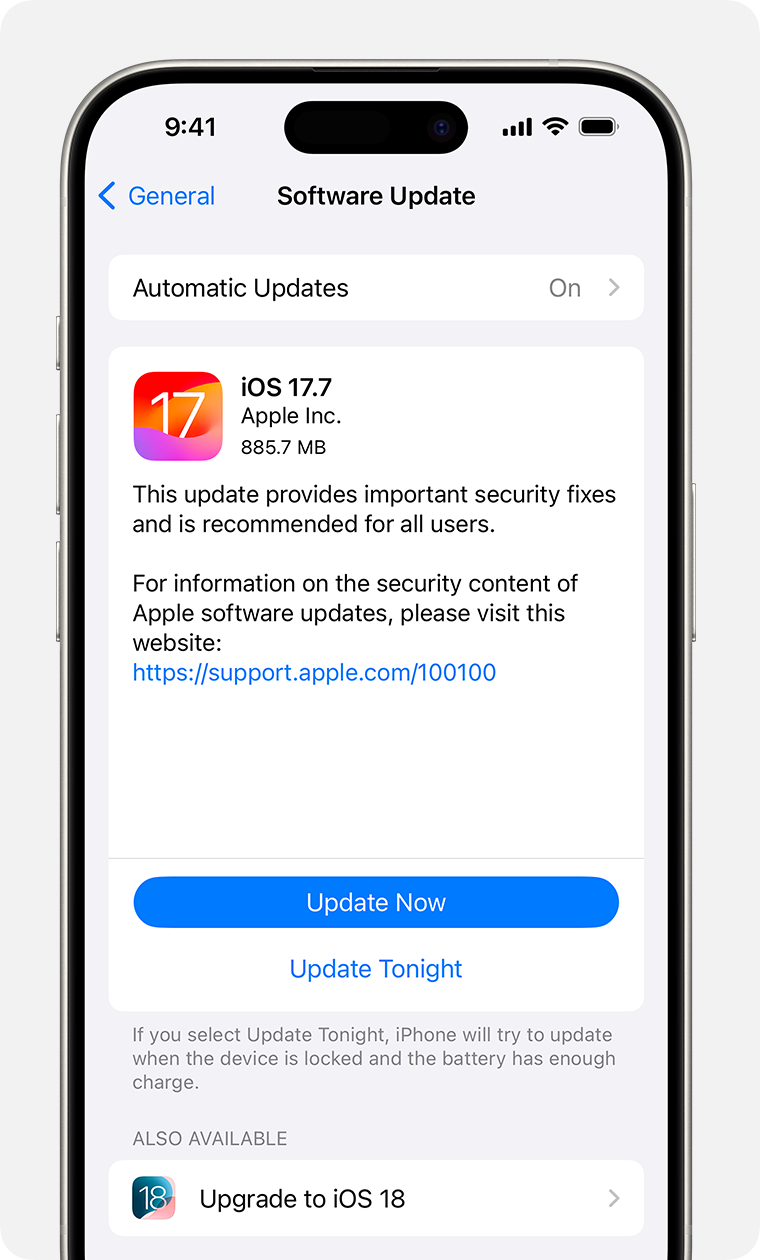
How to Download the Latest iPhone Update
Checking for a new iOS version is straightforward. Follow these steps:
- Open the Settings app on your iPhone.
- Tap General.
- Select Software Update.
- Wait while the phone checks for available updates.
- Read the version number and release information.
- Back up important information before installing the update.
- Tap the available download and installation option and follow the on-screen instructions.
Connect your iPhone to Wi-Fi and make sure the battery is sufficiently charged or the phone is connected to power. The download size and installation time depend on the update and your device.
If no update appears, it may not yet be available for your device or region, or your iPhone may already have the newest compatible version.
Which iPhones Can Receive the Update?
Compatibility depends on the iOS version and the particular iPhone model. Not every older iPhone supports every new major operating system release.
Users should check Apple’s official compatibility information before attempting to install a major update. If the Software Update screen does not offer a newer version, the device may already be up to date or may not support that release.
It is also important to remember that some features are available only on specific models. A feature mentioned in an iOS announcement may not work on every supported iPhone.
Will the New iPhone Update Improve Battery Life?
Battery performance is a common concern after an iOS update. Some users may notice temporary battery drain or increased device warmth while the phone completes background tasks after installation.
Battery performance can vary based on screen brightness, network conditions, app activity, battery health, and the age of the device. A software update does not guarantee longer battery life for every user.
After installing an update, give the device time to finish its background processing and monitor battery usage. If unusual battery drain continues, check Settings and review which apps are consuming the most power.
Should You Install the Latest iOS Update?
For most users, installing a stable iOS update is a sensible way to receive available security fixes and bug improvements. Before proceeding, back up important data and confirm that the update is intended for your device.
Users who depend on their iPhone for school, work, communication, or daily activities may prefer to avoid experimental developer software. Beta and release-candidate versions are intended for testing and may contain problems that affect normal use.
Always review the official release notes before installing an update, particularly when Apple publishes a security-focused release.
Final Words
The latest iPhone update news on October 22, 2026, centres on iOS 27.0.1 and the testing of iOS 27.2 Release Candidate. The available information does not confirm a new stable public iOS release today.
iPhone users should open Settings, select General, and tap Software Update to check the latest version available for their device. Keeping software current, backing up important data, and downloading updates from official Apple channels are practical steps for maintaining an iPhone’s security and reliability.
For the most accurate information about new features, supported devices, and public release dates, consult Apple’s official website and release notes.
.